 MarkPlan Pro
Pencil draws, fingers navigate
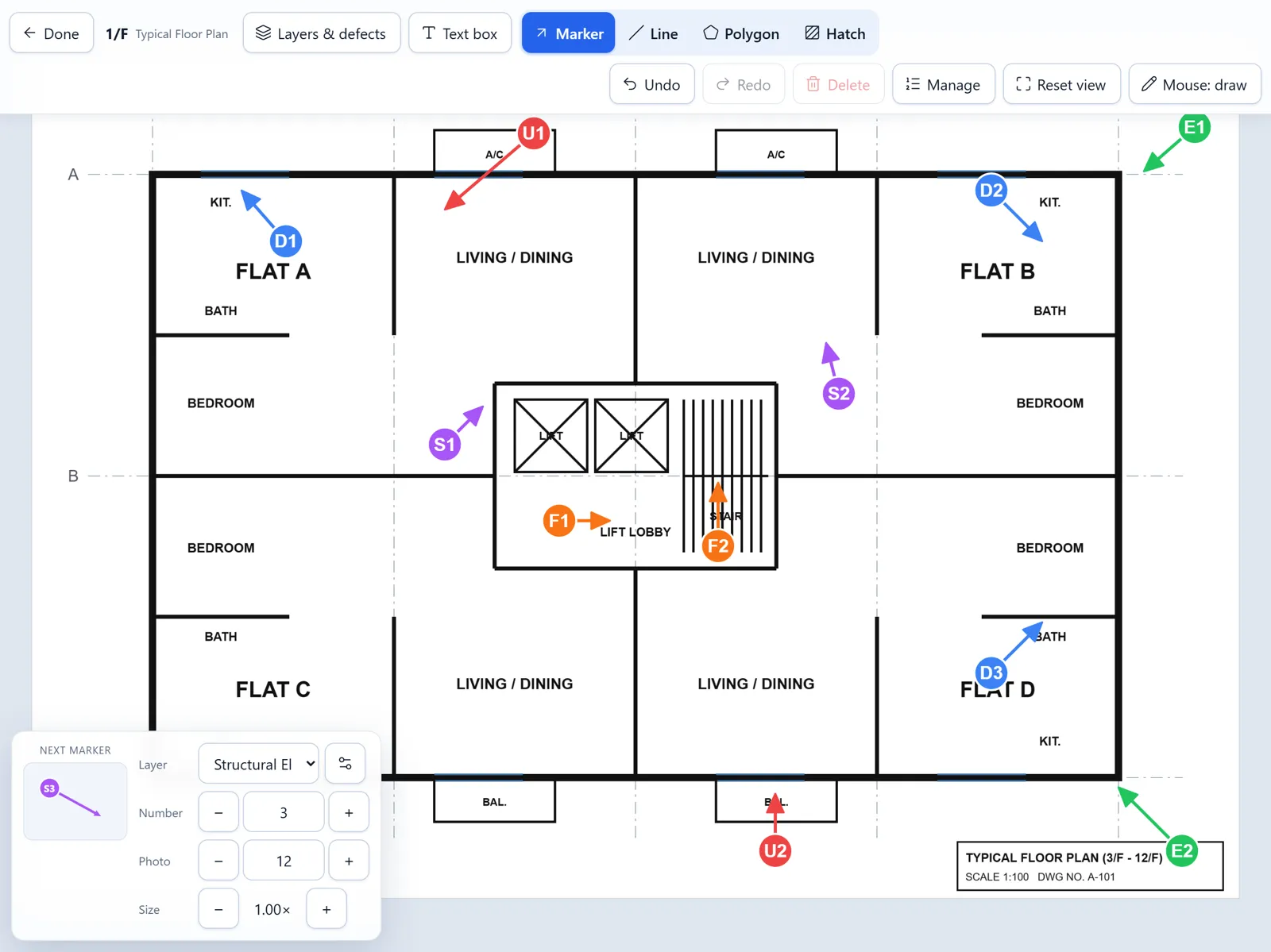
Apple Pencil only ever draws, so a palm or finger never leaves a stray mark. Pinch to zoom, drag to pan, undo and redo anything.
For MBIS & MWIS inspections in Hong Kong
MarkPlan Pro turns an iPad and Apple Pencil into your inspection plan. Draw a numbered arrow where each photo was taken, tag the defect, and export A3 marked floor plans, Summary Tables and a Word photo record — no redrawing back at the office.
Full features · 2 users · no payment details needed
How it works
Import PDF or image floor plans. Reuse one typical plan for many floors, pick the page and rotation per floor.
Fingers pan and zoom; the Pencil draws a numbered arrow — tail where you stood, head where the camera pointed.
Pick the defect type from the Code of Practice list, set the size and add a remark. The camera photo number follows along.
A3 marked plans (PDF + Word), Summary Tables in Excel and a photo report maker — zipped and ready to send.
Features
Every feature came from real MBIS jobs: cramped staircases, no signal on the rooftop, and an appendix due on Friday.
Apple Pencil only ever draws, so a palm or finger never leaves a stray mark. Pinch to zoom, drag to pan, undo and redo anything.
Each layer has its own colour, prefix and numbering, plus the defect list from the Code of Practice.
Record the camera's photo number with each marker. Later, the Photo Report Maker matches your site photos (IMG_6017.JPG → 6017) and builds the photo record for you.
Draw lines and polygons, hatch inaccessible areas, and drop text boxes to cover or relabel wording on a typical floor plan.
Works with no signal in basements and on rooftops. Projects are saved on your iPad, not on our servers. Move a project to another device with a single project file.
Screenshots
Real screens from MarkPlan Pro on a 12.9-inch iPad. The plan is a sample.
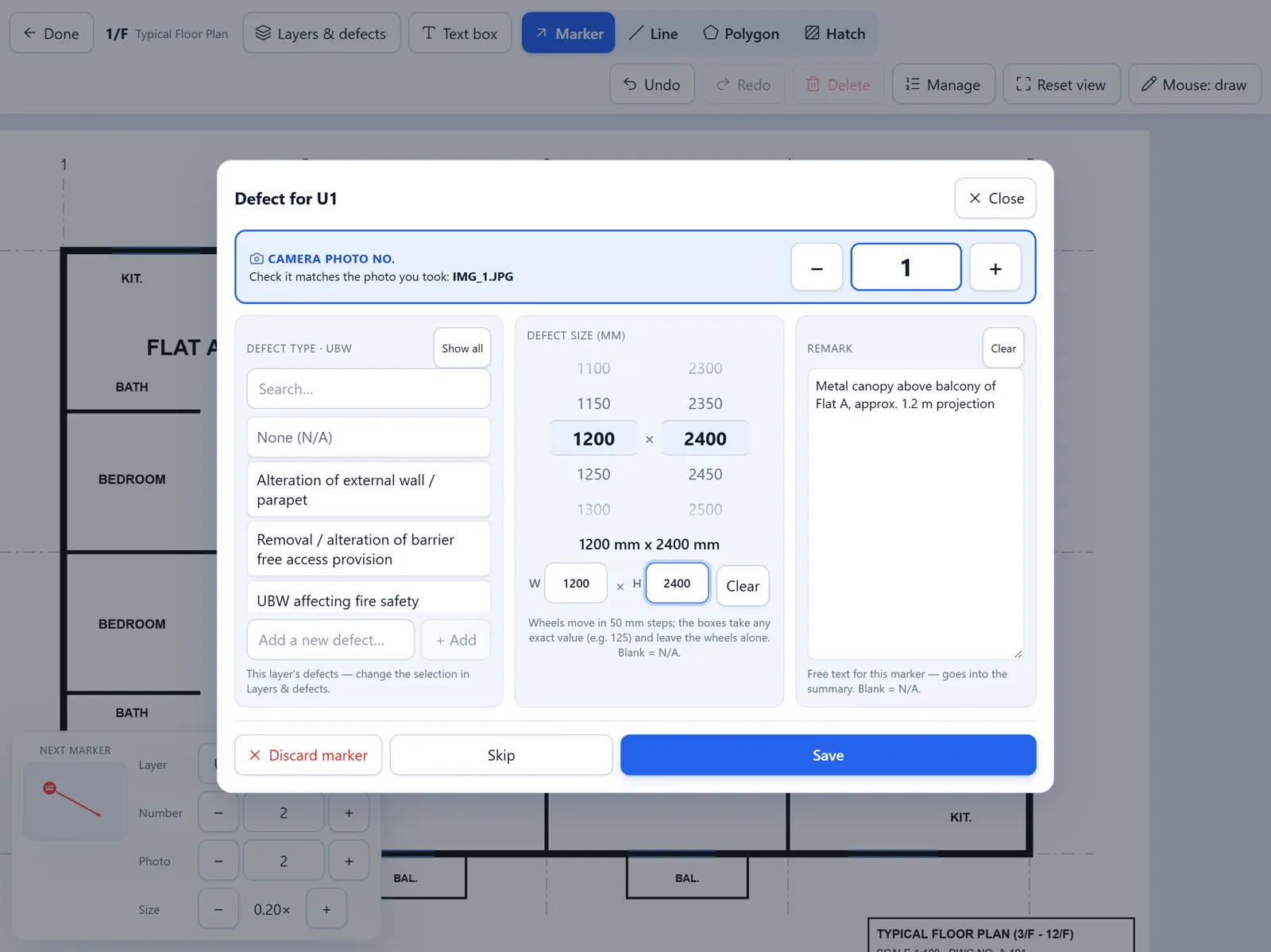
Right after you draw an arrow, a pop-up asks for the camera photo number, defect type, size (scroll wheels or exact mm) and a remark. Skip it when you're in a hurry and fill it in later.
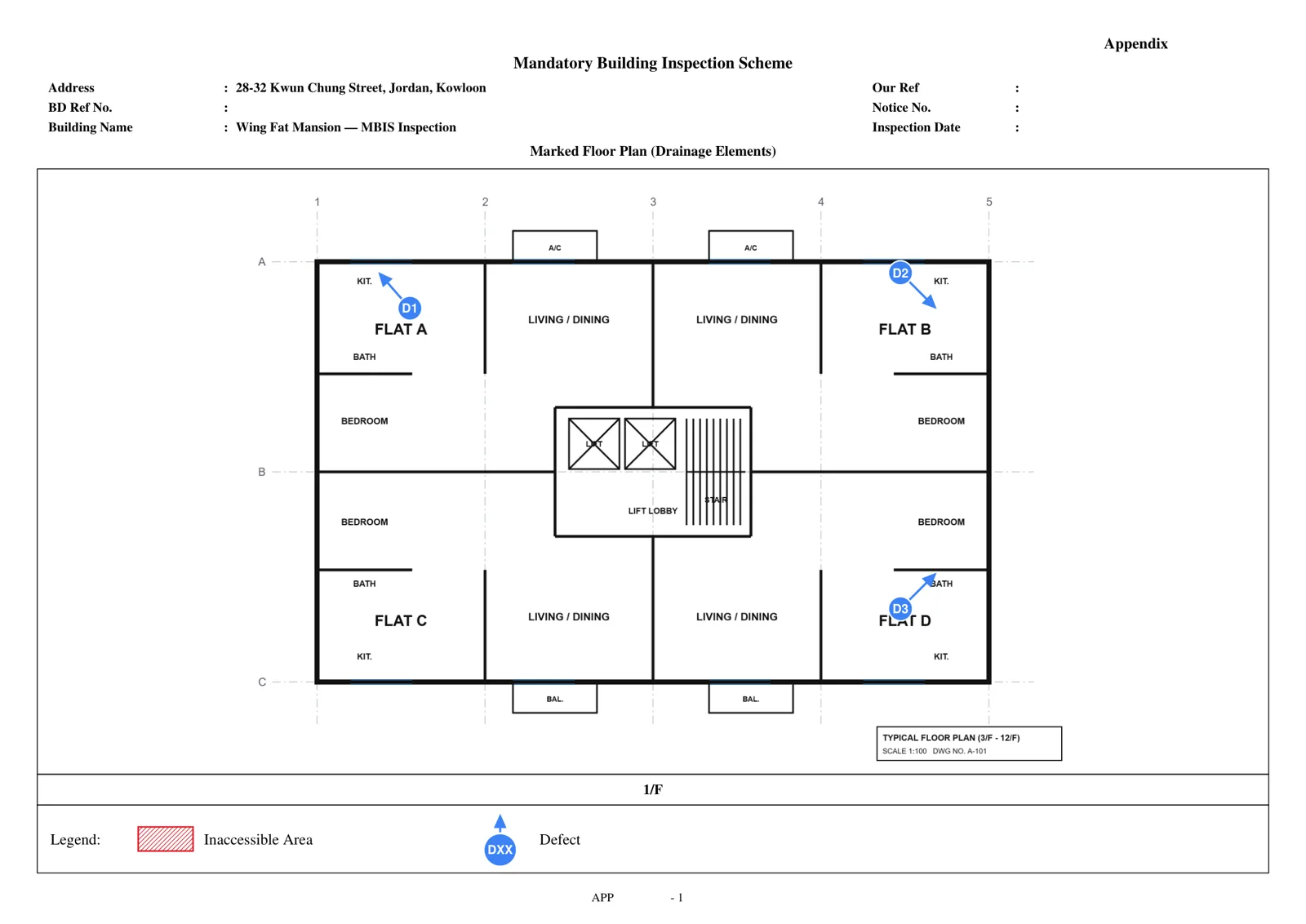
One PDF per layer with the address, building name, floor title and legend already filled in. Our Ref, Notice No. and Appendix blanks are form fields: fill them once and every page updates.
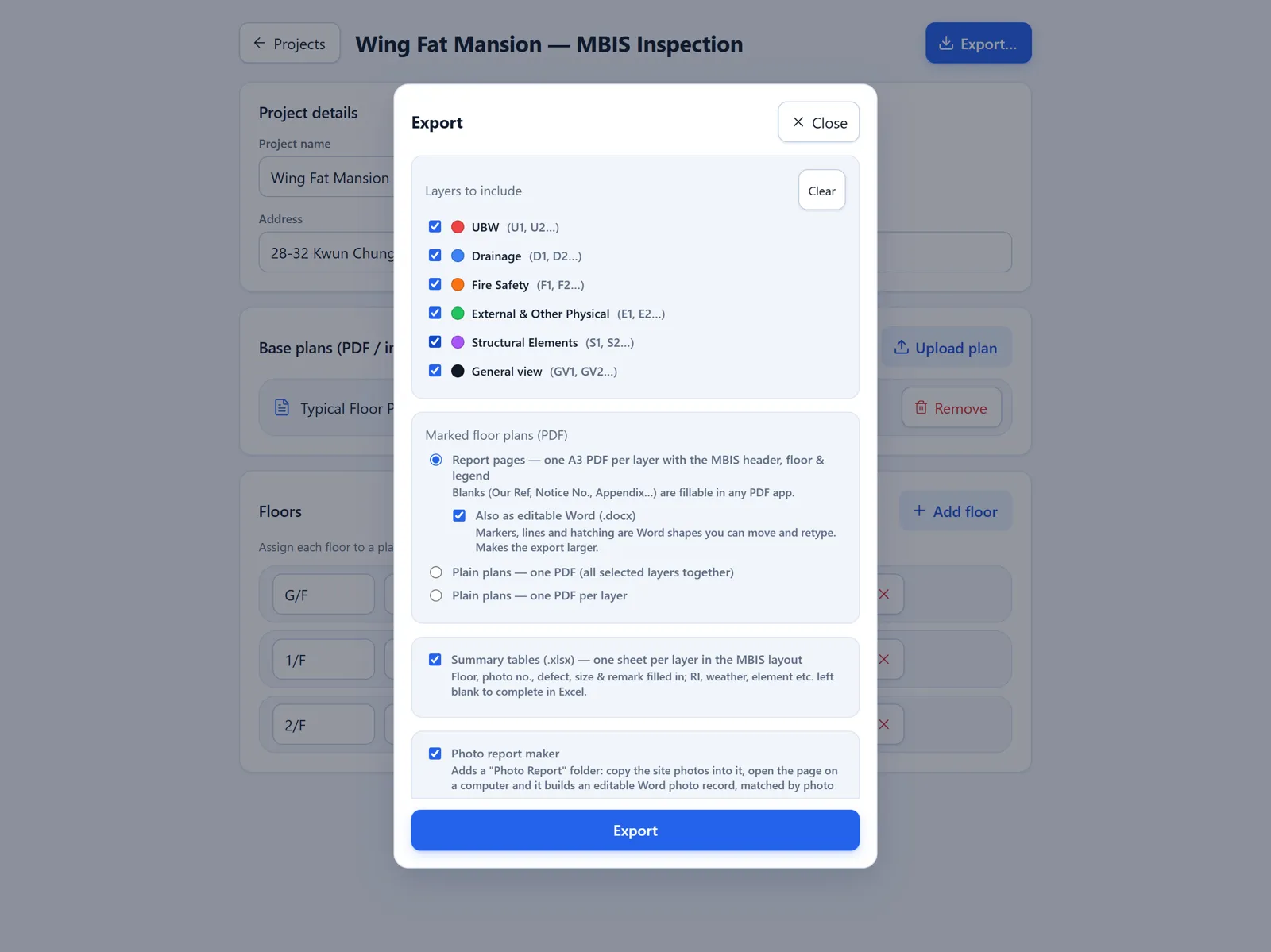
Pick the layers, then report pages or plain plans, editable Word, Summary Tables, the Photo Report Maker, a CSV defect list and the project file itself.
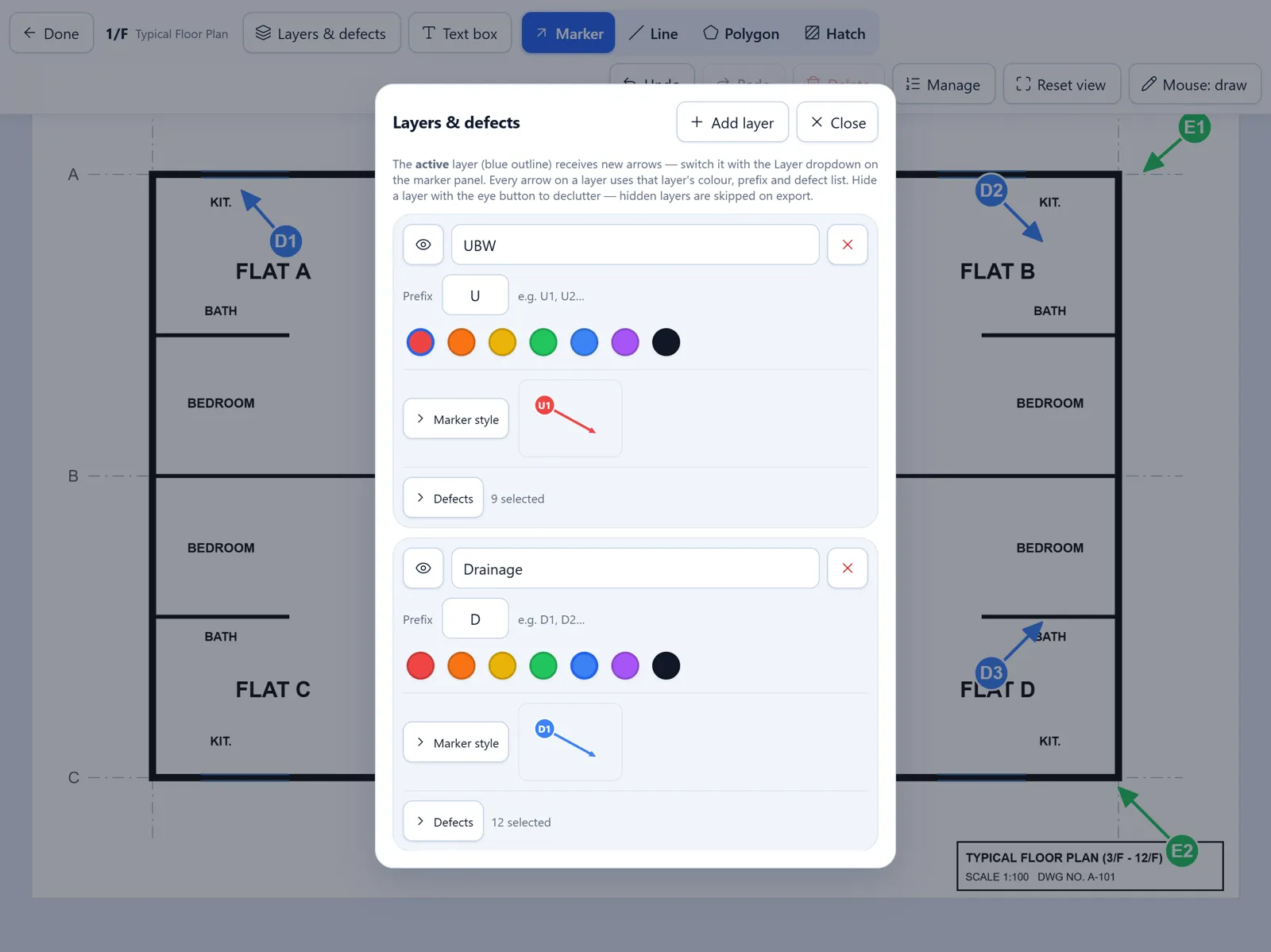
Rename layers, change colours and prefixes, hide a layer to declutter, and trim or extend each defect list to suit the building.
Pricing
Pay yearly and get 2 months free.
Try it on a real job before you decide.
for 14 days
For independent inspectors.
or HK$1,980 / year — save HK$396
For inspection teams of 3 or more.
or HK$1,680 / user / year — save HK$336 each
For firms with 10 or more users.
volume pricing
Prices in HKD. Apple Pencil and iPad not included.
FAQ
An iPad with Safari, ideally with an Apple Pencil. You install it from Safari with Share → Add to Home Screen, and it opens full-screen like any app. It also runs in a desktop browser on Windows or Mac, where the mouse can draw markers.
Yes. Once installed and signed in, everything — marking, editing and exporting — works offline. The app only needs a connection now and then to confirm your subscription and to download updates.
On your own device. Your plans and markings are not uploaded to our servers. We only hold your account details (name, email, company) to manage your subscription. To move a project or keep a backup, export the project file and open it on another device.
Each marker stores the camera's photo number. Export with the Photo Report Maker, copy your site photos into its folder and open the page on a computer: it matches IMG_6017.JPG to marker photo 6017 and builds an editable Word photo record, grouped by layer.
Yes. The A3 PDFs have fillable header fields, the Word plans use real Word shapes you can move and retype, and the Summary Tables open in Excel with the inspection columns ready to complete.
You never lose your work. The app becomes read-only: you can still open and export every project, but you can't add new markings until you renew.
Each user can be signed in on 2 devices, for example an iPad on site and a computer in the office. Signing in on a third device signs out the one used least recently.
No. MarkPlan Pro is an independent tool and is not affiliated with or endorsed by the Buildings Department. Defect categories follow the MBIS / MWIS Code of Practice for convenience; inspection findings and reports remain your professional responsibility.
Free 14-day trial
Tell us a little about you and we'll set up your trial accounts and email you the sign-in details.